
Problem
Two guest list from Meetup: DL and ML. Who is going to both meetups?
Data
Guestlist of DL is an xlsx:

Guestlist of ML will be extracted from web:
(Meetup groups online, search one randomly you will see, for example)

So we need the name list from the right side, “going”.
By using “Inspect”, which helps you a lot when targeting a certain tag. Just find the features (say, what tag you need, and the class name of it.).
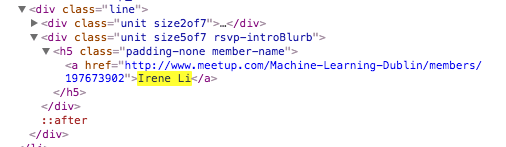
Here, for this case, “Irene Li” is in the <a> tag, there is no class name, so we look outside of it: there is the<h5>tag, with the class name being “padding-none member-name”, a unique name. So the idea is, first we find out all the <h5> tags, whose class name is the given one. Then we get the contents of the <a> tag which is inside of <h5>tag.
Normally you can get url contents by urllib, but I need to login (didn’t do research here), so I saved the html file as an input file.
Tool
Python, well, Jupter Notebook, powerful one.
Code
Libs you might need:
import pyexcel as pe
import pyexcel.ext.xls # import it to handle xls file
import pyexcel.ext.xlsx # import it to handle xlsx file
import urllib # you might not need it
from bs4 import BeautifulSoup
get data from DL, the excel sheet:
print 'hello, they are going:'
records = pe.get_records(file_name=&quot;DL.xlsx&quot;)
a=[]
# for each row, we need information of only two colums
for row in records:
# if the guest is going, then we keep the name
yes=row['RSVPed Yes']
if yes == long(1):
a.append(row['Name'])
print type(a)
print a
Output looks like this:
hello, they are going:
[u'AB', u'AM', u'AK', u'....]
Btw, “type” is useful, I can not clearly remember the obj type sometimes…
get data from the html file:
html = open(&quot;ML.html&quot;,'r').read()
soup = BeautifulSoup(html,&quot;html.parser&quot;)
#for older versions, it should be: soup = BeautifulSoup(html)
# tags = soup('a')
tags = soup.find_all(&quot;h5&quot;, class_=&quot;padding-none member-name&quot;)
# print tag
went = []
for tag in tags:
atag = tag.find(&quot;a&quot;).contents
# the type of atag here is list! so we only need the first item!
went.append(atag[0])
print type(went)
print went
And the output looks like..
[u'Irene Li', u'SY', u'AD',...]
So make sure the two outputs have the same type (list, or set if you want).
Then let’s find out the intersection:
list(set(a) &amp; set(went))
Output:
[u'JG',
 u'GJ',
 u'an',
 u'AM']
 IreneLi